
Why Online File Converters Breach Your Privacy (And How Browser-Based Processing Solves It)
Published on 18 Agustus 2026
The Hidden Risks of Traditional Online File Tools
In an age of remote work and digital collaboration, millions of users rely daily on free online tools to merge PDFs, compress images, or convert documents. However, most popular tools operate on a hidden risk model: they require you to upload confidential files—such as financial reports, personal IDs, or legal contracts—directly to their cloud servers.
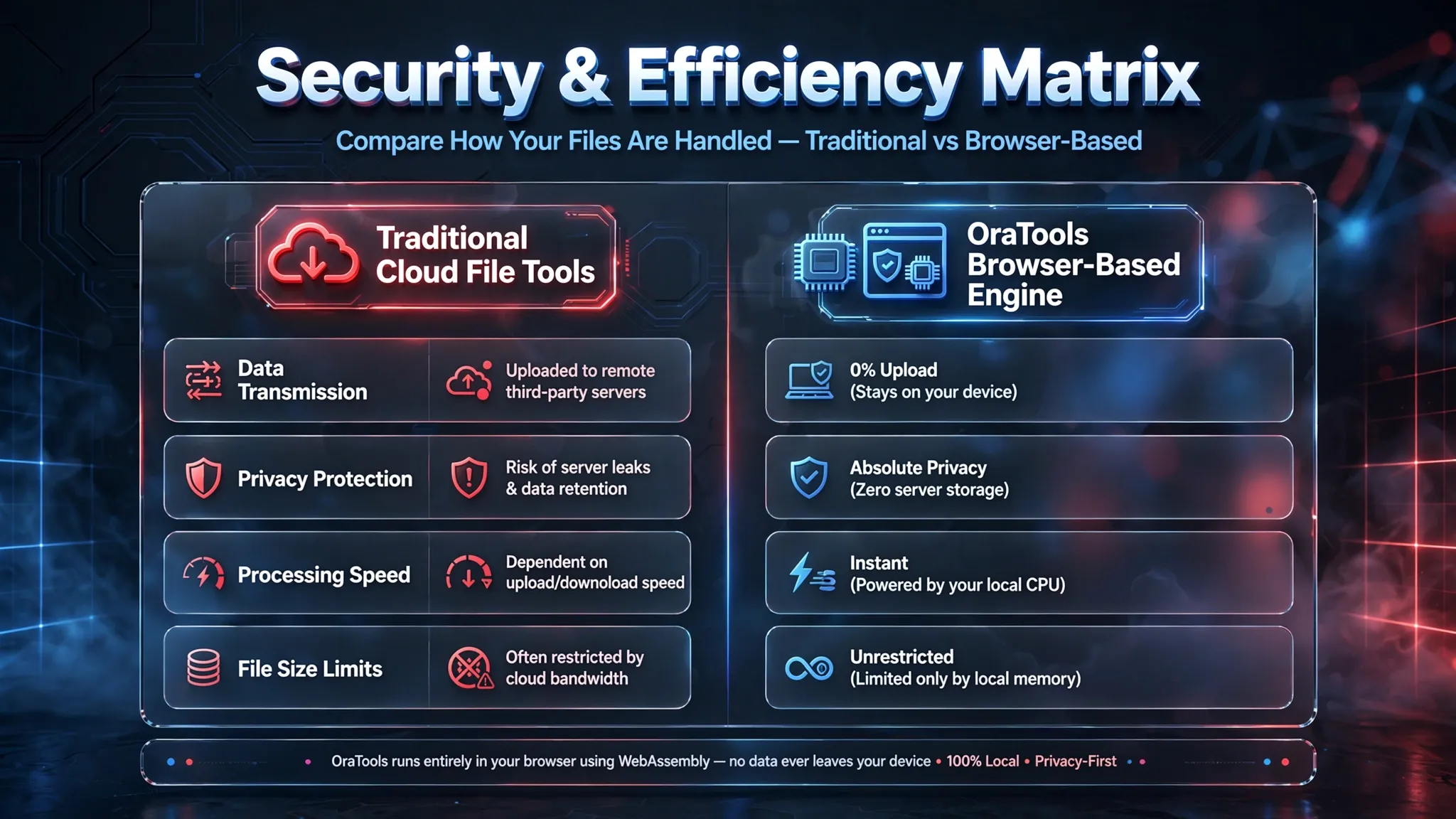
Once a file leaves your device, you lose control over where it is stored, who can access it, or how long it remains on third-party infrastructure. Data breaches, unauthorized server logging, and hidden bandwidth limits are common drawbacks of server-dependent conversion platforms.
This problem directly relates to why many utility blogs face AdSense rejection under "Low Value Content." Generic articles that merely list "top 5 converter sites" without explaining security mechanisms or offering real value fail user expectations. To meet Google’s quality criteria and keep users engaged, content must address real technical concerns—such as file security, local processing, and data sovereignty—while offering practical solutions.

How Client-Side Web Assembly Protects Your Data
The solution to cloud file vulnerability lies in modern browser technology: Client-Side Processing. Instead of sending your documents to a remote server, advanced platforms like OraTools execute conversions, compressions, and edits directly inside your web browser using WebAssembly (Wasm).
By processing files locally on your own CPU and RAM, your confidential documents never cross the internet. This zero-upload approach guarantees complete data privacy while eliminating waiting times caused by slow upload speeds.
Practical Workflow Comparison:
- Traditional Cloud Converters: Select File ➔ Upload to External Server ➔ Wait for Server Processing ➔ Download File back ➔ High Privacy Risk & High Bandwidth Usage.
- OraTools Local Processing: Select File ➔ Browser Processes Instantly ➔ Save File ➔ 100% Private, Zero Upload, Lightning Fast.
Streamlining Your Daily Workflow with Free, Privacy-First Tools
Beyond privacy, speed and convenience determine productivity. Switching between different specialized platforms for PDF editing, image resizing, and video compression slows down daily operations and increases security risks.
Having a single, privacy-focused toolkit—such as OraTools—simplifies digital workflows into three main advantages:
All-in-One Utility: Seamlessly transition between PDF tools (Merge, Compress, Split), Image editors (Resize, Background Remover), and Converters (Video, Audio, Format Conversion) without navigating away.
No Registration Friction: Start managing files immediately without registration barriers or subscription paywalls.
Cross-Platform Consistency: Enjoy full responsiveness whether working on a desktop workstation, tablet, or mobile device.