
The Hidden Security Risks of Cloud-Based File Converters: Why In-Browser WebAssembly is the Future of Digital Privacy
Published on 18 Agustus 2026

The Zero-Price Paradox & Cloud Data Vulnerabilities
Every day, millions of remote workers, legal professionals, and financial analysts upload sensitive documents—such as tax filings, medical records, and employment contracts—to free online file conversion utilities. While these platforms offer convenience, they operate on an infrastructure that inherently compromises data sovereignty.
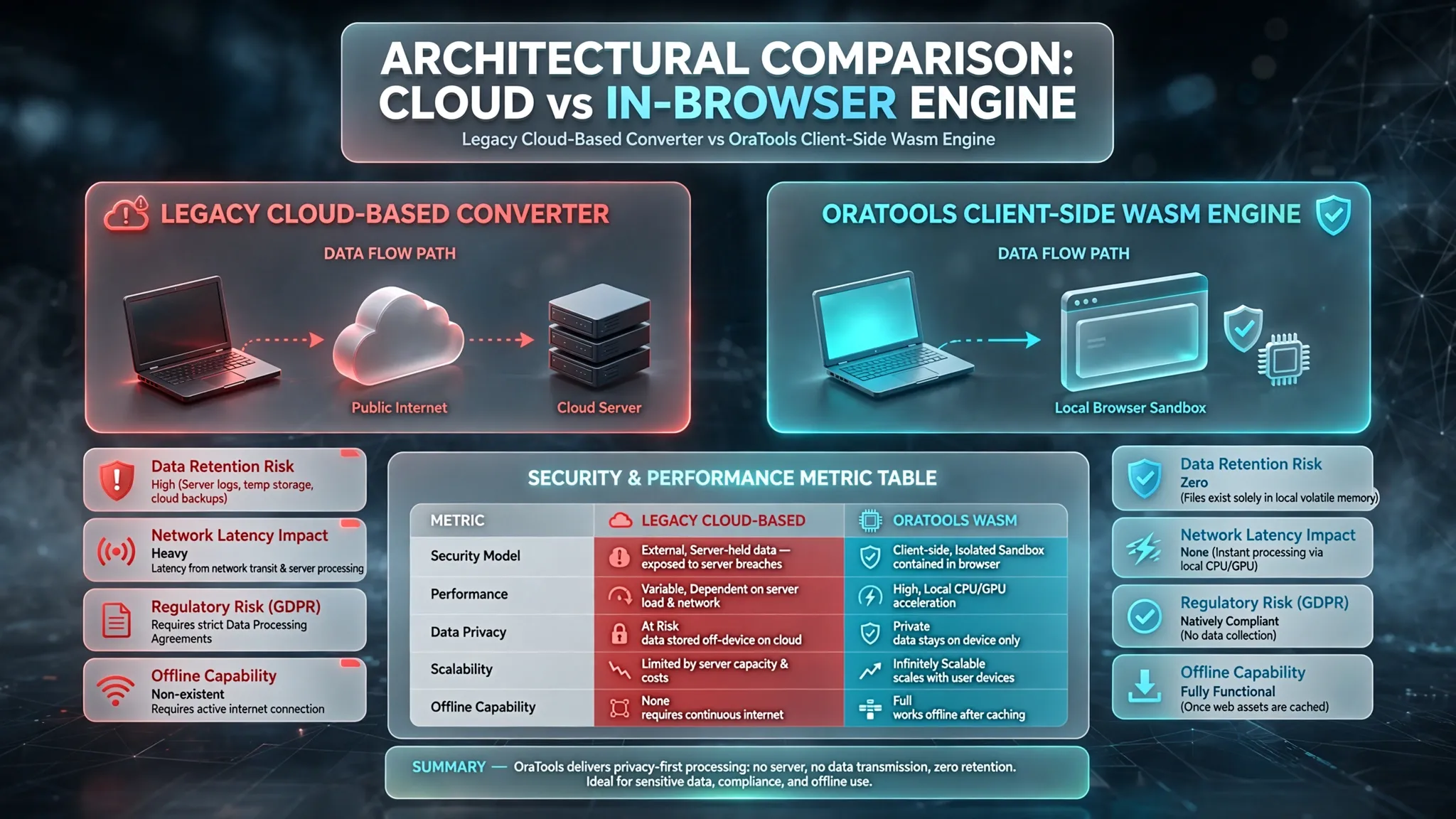
When you upload a document to a conventional cloud-based converter, your file traverses multiple public network nodes before arriving at a third-party server. Once received, the server executes the file conversion, temporarily stores the output, and serves a download link. This architecture presents three major attack vectors and privacy concerns:
-
Unencrypted Server Retention: Many free utility sites retain uploaded files in temporary cloud buckets (e.g., AWS S3 or Google Cloud Storage) for hours or days. If these buckets are misconfigured, your sensitive documents become accessible to unauthorized web scrapers.
-
Third-Party Data Harvesting: Free services must monetarily sustain server compute costs. Several free converter operators explicitly state in their privacy fine print that non-personally identifiable metadata, document structures, or extracted text may be analyzed or shared with third-party ad networks.
-
Man-in-the-Middle (MitM) Interception: Transmitting unencrypted or weakly encrypted files over public Wi-Fi networks exposes documents to packet sniffing before they even reach the conversion server.
From an SEO and Google AdSense evaluation standpoint, generic articles stating "Use free online converters to edit PDFs" are classified as Low Value Content because they ignore these critical technical realities. High-value editorial standards require an in-depth analysis of data flow mechanisms, security protocols, and regulatory compliance.

WebAssembly & Client-Side Execution: A Technical Paradigm Shift
To solve the security vulnerabilities of cloud-based file processing, modern web development has shifted toward Client-Side Processing powered by WebAssembly (Wasm). Platforms like OraTools utilize this architecture to eliminate server uploads entirely.
WebAssembly is a low-level binary instruction format that allows web browsers to run complex C++, Rust, or Go code at near-native execution speed. Instead of sending your PDF or image to an external server, your browser downloads a sandboxed micro-engine that processes the file directly on your local hardware (CPU and RAM).
How In-Browser Processing Guarantees Security:
1. Zero Network Transmission:
Your file never leaves your local device. The entire conversion—whether merging PDFs, compressing images, or extracting audio—occurs within your browser's isolated memory space.
2. Regulatory Compliance (GDPR & CCPA):
Because no personal data or files are transferred, processed, or stored on external servers, local client-side processing natively complies with strict global privacy mandates without requiring complex consent forms.
3. Hardware-Accelerated Speed:
Processing speed is bound only by your local system performance, bypassing network latency, upload bandwidth throttles, and server queue wait times.
Building a Privacy-First Workflow for Maximum Productivity
For businesses, freelancers, and privacy-conscious users, integrating client-side file tools into daily operations is no longer optional—it is a core cybersecurity best practice. Relying on an all-in-one local toolkit simplifies workflows while fortifying data security.
Key Operational Advantages of In-Browser Utilities:
Unified Utility Suite: Switch seamlessly between PDF operations (Merging, Splitting, Page Counting), Image Optimization (Background Removal, Upscaling, Cropping), and Media Conversions without juggling multiple untrusted third-party sites.
Unrestricted Large File Handling: Traditional converters cap free uploads at 10MB–50MB to save server bandwidth. In-browser tools handle multi-gigabyte files effortlessly, limited only by your computer's RAM.
Zero Account Requirements: Eliminates password fatigue and credential leak risks associated with creating accounts on random conversion portals.